Demystifying Docker DNS: How Containers Talk
Prajwal Chincholikar
- 4 minutes read - 746 wordsDocker containers need a reliable way to find and talk to each other without hard-coding IP addresses. Docker’s embedded DNS resolver handles that automatically, letting you reference containers by name and scale services without rewiring your network. This post walks through how that resolution works under the hood, what the defaults look like, and how to customize DNS when your setup demands it.
When working with Docker containers, networking plays a crucial role in enabling communication between containers and the outside world. One fundamental aspect of container networking is DNS (Domain Name System), which allows containers to discover and communicate with each other using domain names instead of relying on IP addresses. In this post, we’ll explore Docker DNS and how it facilitates container communication.
What is DNS?
The Domain Name System (DNS) is a hierarchical decentralized naming system that translates human-readable domain names, like www.example.com, into IP addresses, such as 192.0.2.1. DNS acts as the phonebook of the internet, enabling computers to locate and connect with each other using recognizable names.
Docker DNS Resolution
In the context of Docker, DNS resolution refers to the process of translating domain names into IP addresses for containers running on the same network. Docker provides a built-in DNS service that allows containers to resolve domain names to the correct IP addresses within the same Docker network. By default, Docker containers use the embedded DNS resolver provided by the Docker daemon.
Docker Default DNS Configurations
When you create a Docker network, it automatically configures DNS resolution for containers within that network. By default, Docker uses the following DNS configurations:
- Docker daemon as the DNS server: Containers use the Docker daemon’s embedded DNS resolver, which listens on the default DNS server IP address 127.0.0.11. This DNS server handles DNS queries from containers and forwards them to the appropriate DNS server for resolution.
- Container name as hostname: Docker automatically assigns a unique hostname to each container, which is the container’s name. This hostname can be used for internal DNS resolution within the Docker network.
- Automatic DNS aliasing: Docker provides automatic DNS aliasing for container-to-container communication. Each container’s name is mapped to an IP address in the Docker network’s DNS server. This allows containers to resolve other containers’ domain names by using their respective names as hostnames.
Docker provides its own DNS resolution mechanism that allows containers to resolve domain names within the Docker network. Let’s delve into the Docker DNS architecture using diagrams:
Default DNS Configuration
By default, Docker containers use the embedded DNS resolver provided by the Docker daemon. The following diagram illustrates the default DNS configuration in Docker:
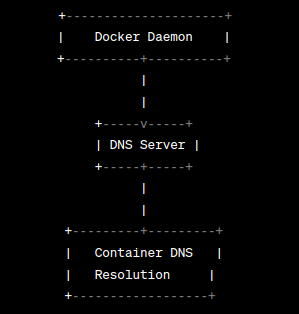
In this diagram, the Docker daemon acts as a DNS proxy, receiving DNS queries from containers and forwarding them to the appropriate DNS server for resolution.
Container-to-Container Communication
Docker enables easy communication between containers using DNS. The following diagram illustrates the DNS resolution process for container-to-container communication within a Docker network:
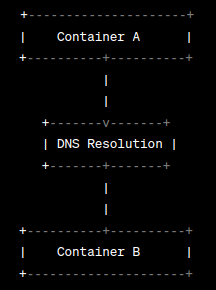
In this diagram, Container A wants to communicate with Container B. It can use Container B’s name as a hostname in its DNS resolution process. Docker automatically maps each container’s name to an IP address in the Docker network’s DNS server, allowing containers to resolve domain names to the correct IP addresses.
Custom DNS Configuration
Docker also allows custom DNS configurations to meet specific requirements. The following diagram showcases a custom DNS setup for Docker containers:
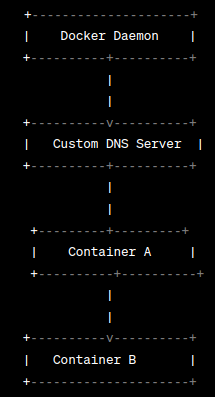
In this diagram, a custom DNS server is specified during the creation of the Docker network. Containers within that network will use the specified DNS server for resolution instead of the default Docker daemon’s DNS resolver.
Use Cases and Benefits
Docker DNS resolution offers numerous benefits and caters to various use cases, including:
- Simplified container communication: DNS allows containers to communicate with each other using domain names, simplifying network management within Docker environments.
- Service discovery: Docker DNS facilitates service discovery within containerized applications, as containers can locate and connect to other services using human-readable domain names.
- Dynamic scaling: Docker DNS provides a reliable mechanism for updating DNS records dynamically, ensuring proper connectivity between containers during scaling events.
Conclusion
Understanding Docker DNS and its architecture is vital for effective container networking. Docker’s built-in DNS service simplifies container communication and enables service discovery within Docker networks. With the help of diagrams, we’ve visualized how DNS resolution works in Docker, both with default configurations and custom setups. By leveraging Docker DNS, you can optimize your containerized applications and streamline networking operations. Happy containerizing!