Palo Alto Networks - Define Traffic to Decrypt
Palo Alto Networks
- 2 minutes read - 412 wordsDecryption Policy rules give you precise control over which traffic your firewall inspects and which it lets pass untouched. Getting this right matters because misconfigured decryption can leave dangerous traffic encrypted and invisible, or force you to decrypt personal data you should never touch. This guide walks through the core concepts, URL category best practices, and how to block QUIC so your firewall can actually see what is crossing the network.
Overview
Use Decryption Policy rules to define the traffic you decrypt and the traffic you choose not to decrypt because of regulations, business reasons, or privacy reasons.
A Decryption policy rule allows you to define traffic that you want the firewall to decrypt and to define traffic that you choose to exclude from decryption because the traffic is personal or because of local regulations, for example.
Attach a Decryption profile to each Decryption policy rule to enable certificate checks, session mode checks, failure checks, and protocol and algorithm checks, depending on the profile. These checks prevent risky connections, such as sessions with untrusted certificate issuers, weak protocols, ciphers, and algorithms, and servers that have certificate issues.
Best Practices for URL Categories
As a best practice, you should always block known dangerous URL Filtering categories such as malware, phishing, dynamic-dns, unknown, command-and-control, proxy-avoidance-and-anonymizers, copyright-infringement, extremism, newly-registered-domain, grayware, and parked. If you must allow any of these categories for business reasons, you must decrypt them and apply strict Security profiles to the traffic.
URL categories that you should always decrypt if you allow them include: online-storage-and-backup, web-based-email, web-hosting, personal-sites-and-blogs, and content-delivery-networks.
Blocking QUIC
In Security policy, block Quick UDP Internet Connections (QUIC) protocol unless for business reasons, you want to allow encrypted browser traffic. Chrome and some other browsers establish sessions using QUIC instead of TLS, but QUIC uses proprietary encryption that the firewall can’t decrypt, so potentially dangerous traffic may enter the network as encrypted traffic. Blocking QUIC forces the browser to fall back to TLS and enables the firewall to decrypt the traffic.
Create a Security policy rule to block QUIC on its UDP service ports (80 and 443) and create a separate rule to block the QUIC application. For the rule that blocks UDP ports 80 and 443, create a Service (Objects > Services) that includes UDP ports 80 and 443:
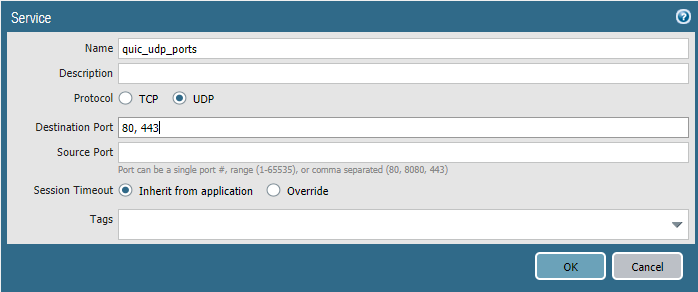
Use the Service to specify the UDP ports to block for QUIC. In the second rule, block the QUIC application:
