Nginx Flood Protection with limit_req
KBeezie
- 3 minutes read - 564 wordsA single misbehaving client or a coordinated flood of requests can take down a PHP-backed site in seconds. Nginx’s limit_req module gives you a lightweight, per-IP rate limiter that sits right in front of your application, so you can shed excess load before it ever reaches your workers.
For this test I’m using a copy of my site’s about page saved as about.html, and the Blitz.io service (which is free at the moment) to test the limit_req directive.
First I test the page with the following command in Blitz, which will essentially ramp the number of concurrent connections from 1 to 1,075 over a period of 1 minute. The timeout has been set to 2 minutes, and the region set to California. I also set it to consider any response code other than 200 to be an error, otherwise even a 503 response will be considered a hit.
-p 1-1075:60 --status 200 -T 2000 -r california http://kbeezie.com/about.html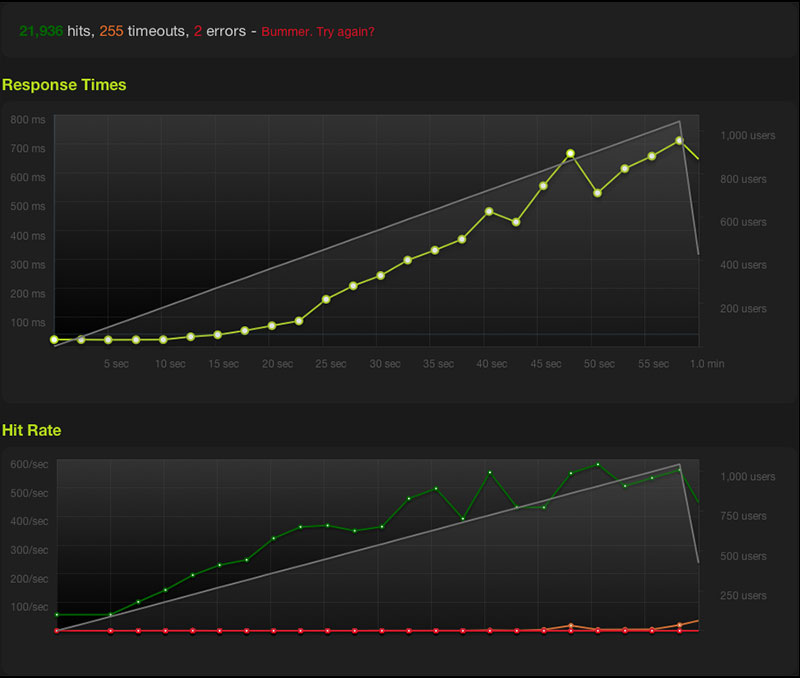
Not bad, right? But what if that were a PHP document? That many users frequently might cause your server to show 502/504 errors as the PHP processes behind it keep crashing or timing out. This is especially true if you’re using a VPS or an inexpensive dedicated server without any additional protection. (Though if you use either, iptables or pf might be a good resource to look into.)
You can of course use caching and other tools to help improve your website, such as using a WordPress caching plugin, which you should be using anyways. But sometimes that one lone person might decide to hit one of your PHP scripts directly. For those type of people we can use the limit request module.
Let’s create a zone in our http { } block in Nginx. We’ll call it blitz and set a rate of 5 requests per second, with the zone holding up to 10 MB of data. I’ve used $binary_remote_addr as the session variable since you can pack a lot more of those into 10 MB of space than the human-readable $remote_addr.
limit_req_zone $binary_remote_addr zone=blitz:10m rate=5r/s;Then inside my server block I set a limit_req for the file I was testing above:
location = /about.html {
    limit_req zone=blitz nodelay;
}
So I reload Nginx’s configuration and I give Blitz another try:
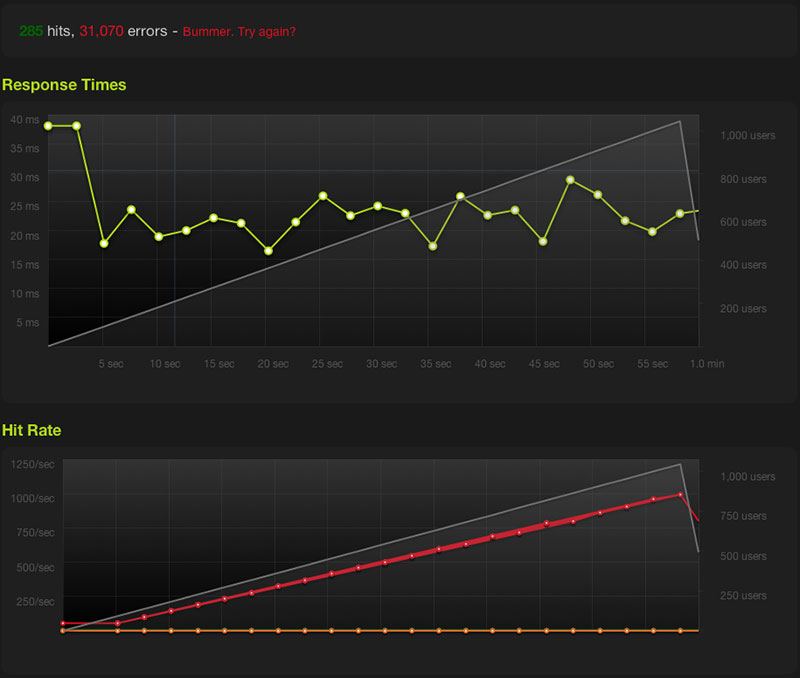
You’ll notice that now only about 285 hits made it to the server. That’s roughly 4.75 requests per second, just shy of the 5 r/s we set for the limit. The rest of the requests were hit with a 503 error. If you check out the access log for this you’ll see that a majority of the requests will be the 503 response with spurts of 200 responses mixed in there.
Using this can be quite helpful if you want to limit requests to certain weak locations on your website. It can also be applied to all PHP requests.
Applying Limit Request to PHP
If you would like to limit all access to PHP requests you can do so by inserting the limit_req directive into your PHP block like so:
location ~ \.php {
    limit_req zone=flood;
    include php_params.conf;
    fastcgi_pass unix:/tmp/php5-fpm.sock;
}
It may help to play with some settings like increasing or decreasing the rate, as well as using the burst or nodelay options. Those configuration options are detailed in the HttpLimitReqModule documentation.