Linux Network Ring Buffers
Luke Hebert
- 7 minutes read - 1310 wordsUnderstanding how Linux allocates and drains network ring buffers can save you hours of guessing when packet drops or high softirq CPU usage show up on a busy server. This post walks through the RX and TX ring buffer internals, the DMA path, and the practical tuning levers available through ethtool and /proc/sys/net/core/netdev_budget.
What Are Network Ring Buffers?
A network ring buffer is a memory region where the NIC has direct access (over DMA) to store incoming data. There are actually two parts: a ring (fixed-size circular queue) of descriptors/addresses that point to memory regions holding data, and the “buffer” or memory part itself, which is handled by the kernel in the background.
There are two types of ring buffer:
- RX ring buffer for receiving data
- TX ring buffer for sending data
Both of those TX/RX ring buffers are bound to a specific network interface and shared between applications that send/receive through that interface. Knowing their limits is important.
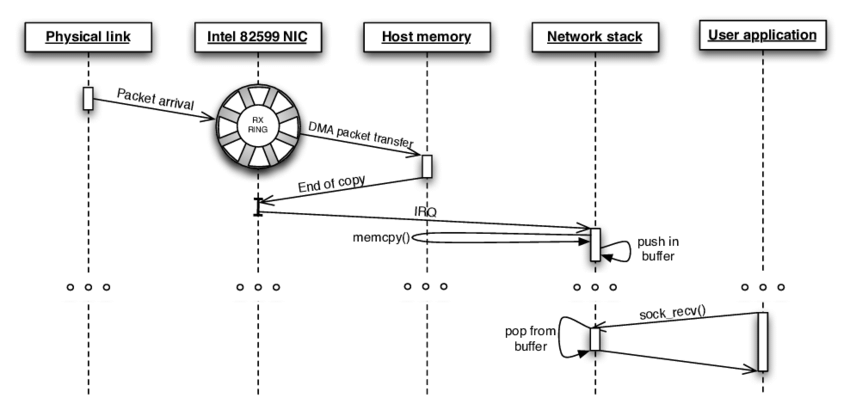
The Ring / Queue Part
The ring buffer is basically a fixed-size circular FIFO queue (which contains descriptors, or simply pointers to memory addresses). Because the queue has a fixed size, there will be a situation where the queue overflows.
When you send or receive more data than you can process, the queue fills up and packets get dropped. Luckily we can check for this using ethtool:
ethtool -S enp8s0f0 | grep dropdropped_smbus: 0
tx_dropped: 0
rx_queue_0_drops: 0
rx_queue_1_drops: 0
rx_queue_2_drops: 0
rx_queue_3_drops: 0
rx_queue_4_drops: 0
rx_queue_5_drops: 0
rx_queue_6_drops: 0
rx_queue_7_drops: 0When the number of dropped packets increases, we can try increasing the ring buffer size. There are two ways to do that:
- Increase the size of each queue: The length of the queue is the number of descriptors pointing to allocated memory regions via DMA. A longer queue means more places to store data. Use
ethtool -gto show the maximum possible and current values, andethtool -Gto adjust it. - Use multi-queue NICs: Modern NICs support multiple queues, meaning multiple separate DMA mappings in parallel, thus bigger throughput. Use
ethtool -lto view the current setting andethtool -Lto adjust it.
Though, as with any queue, increasing the queue size will not solve every issue. A long queue can give you high throughput but can cause high latency outliers. A short queue can optimize latency but comes with the risk of dropping packets when there is too much to handle. Use it at your own risk.
In the sending path, Linux implements features like queuing disciplines and Byte Queue Limit to solve the queue problem automatically. On the receiving path, there is nothing equivalent.
The Buffer / Memory Part
The RX ring buffer is like an in-memory “Kafka topic” holding all incoming packets that we need to consume as quickly as possible. The consumer here is the ksoftirqd -> net_rx_action handler, which in turn calls a driver-specific poll function. In our case, that is eventually igb_poll.
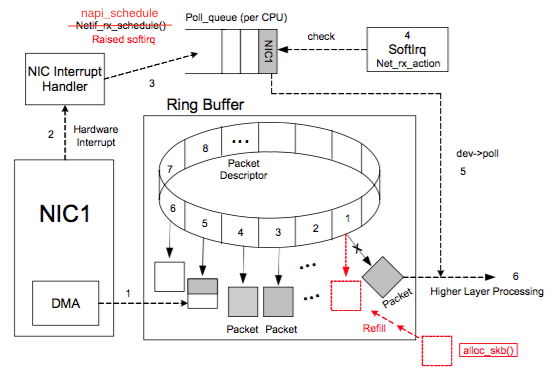
The very simplified asynchronous process looks like this:
- The incoming packet arrives at the network interface card (NIC). The NIC saves it to the RX buffer in memory (our “Kafka topic”) via DMA (no CPU involvement).
- When data is already saved in RAM, the NIC sends a hardware interrupt to tell the CPU about the new arrival.
- The CPU replies very quickly to release that interrupt, and sends another signal (
NET_RX_SOFTIRQ) toksoftirqd. - The NIC can receive another packet and the CPU can handle other interrupts, while
ksoftirqdstarts consuming data from the RX buffer in the background without blocking the whole process. The main idea is that the hardware interrupt should be handled as quickly as possible. The software interrupt does the real work.
Here is a real-world kernel stack (traced with bpftrace):
netif_receive_skb_internal+1
napi_gro_receive+186          // End of pulling data out of rx ring buffer
igb_poll+1153
net_rx_action+329
__do_softirq+222
irq_exit+186
do_IRQ+127
ret_from_intr+0
cpuidle_enter_state+182
do_idle+552
cpu_startup_entry+111
start_secondary+420
secondary_startup_64+164
(If you want to know more details about the sequence of steps Linux follows while receiving packets, read this fantastic article.)
Now we are dealing with data, and the size (in bytes, not queue length) matters.
What I do not know for sure right now is: what is the maximum possible size of DMA memory allocated for all descriptors registered in the TX ring? And what happens if we cross that limit?
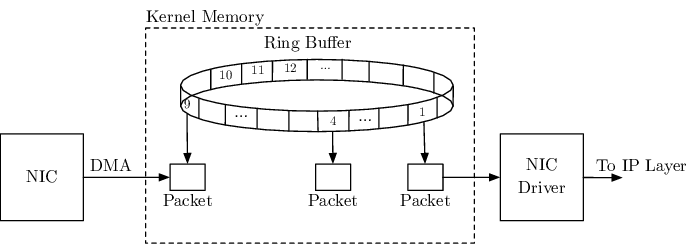
At device initialization, Linux calls a driver-specific function to create resources. In our case, that is igb_setup_rx_resource, which allocates both the buffer (via vmalloc) and the ring descriptors via dma_alloc_coherent. The size of the buffer is:
sizeof(struct igb_rx_buffer) * rx_ring->count;The size of igb_rx_buffer is a bit bigger than struct page, which is around 64 bytes. So a DMA range for one NIC, if I understand all of this correctly, is up to:
64 * 4096 (max rx queue size for a normal NIC) * 8 (number of queues) = 2 MBThat is still good enough. Each “buffer,” represented by an sk_buff struct, is an Ethernet data frame. NICs follow the IEEE 802.3 standard, and each frame size is up to 1522 bytes. Some NICs support jumbo frames at around 9000 bytes (must be enabled on both send and receive ends), still well under our limit.
In case you use a custom NIC that sends an “illegal” data size, the packet can be dropped, or worse, the system can crash.
Thus, without any hacky violation of a custom NIC, we should not worry about RX buffer overflow because:
- The allocated memory should be enough.
- The number of incoming packets can be controlled by ring/queue size: if there is too much to handle, packets will be dropped.
- The ring buffer is drained (consumed) by
net_rx_action, in our caseigb_poll, continuously.
In a very busy network server, you may see ksoftirqd consuming quite a lot of CPU. If you dig deeper with perf, for example, igb_poll can be the hot code consuming a significant CPU share. It is just actively shoveling data out of the RX ring buffer.
There are three things that can stop net_rx_action/igb_poll from doing that:
- There is no more data to read.
- It reaches its budget limit, which controls it from consuming too much CPU.
- It takes too long to finish.
Following that fantastic article, we can detect and improve those cases by checking /proc/net/softnet_stat:
cat /proc/net/softnet_stat | awk '{print $3}'0000000c
0000002b
00000004
00000075
00000018
00000003
0000006e
00000071Field $3 is sd->time_squeeze: the number of times the net_rx_action loop terminated because the budget was consumed or the time limit was reached, but more work could have been done. Increasing the budget can help reduce this.
If those values are greater than 0, we have hit a limit. In that case, we can let net_rx_action/igb_poll use more CPU by increasing the budget:
echo your_value > /proc/sys/net/core/netdev_budgetThe default is 300. If you have plenty of free CPU and irqbalance installed, feel free to triple it or more. Observe both %si in CPU utilization and the data in softnet_stat to see the effect.
One more thing we can do is speed up memory reading by using faster RAM or checking for NUMA-related issues.
A simple but crucial point: faster and bigger CPU and RAM do increase network performance in terms of both latency and throughput.
Epilogue
The Linux ring buffer internals, the NIC initialization process, and the send/receive sequence of steps are far more complicated than what is described here. I just want to explain the important things in the most understandable form so everybody can apply them easily in daily tasks. Hope it helps.
More posts about Linux networking are coming. Stay tuned.