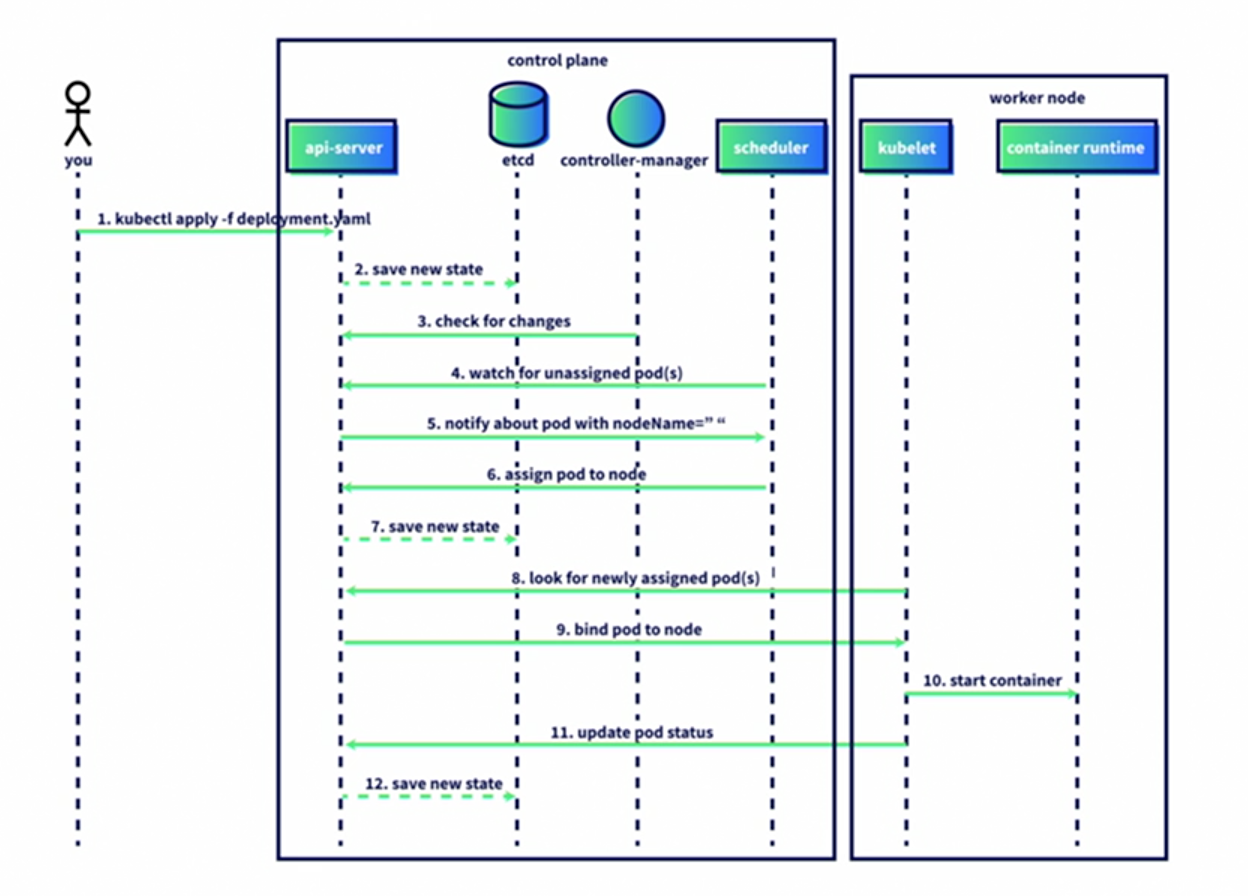
Kubernetes Deployment Scheduler Sequence
Luke Hebert
- 3 minutes read - 493 wordsA time sequence diagram illustrates the sequential steps involved when a pod is scheduled onto a Kubernetes node, from the initial kubectl command through to the kubelet reporting pod status back to the API server. The diagram simplifies a complex set of concurrent processes into a clear, ordered flow that shows how the control plane and a worker node collaborate to bring a pod to life.
How a Pod Gets Scheduled: A Time Sequence Diagram
A time sequence diagram visualizes how the Kubernetes control plane and a node work together to create a pod. The diagram shows the sequential order of actions as they occur, with the first action at the top and the last at the bottom. Software processes are often complex, and things can occur at the same time, so this diagram is a simplification of how Kubernetes works, but it shows the basic order of how a pod gets scheduled onto a node.
There are three different parts of this diagram. On the left is an icon of a person that represents you running a kubectl command from your computer. In the middle, there is a representation of the Kubernetes control plane with all its components, and on the right side of the diagram is a representation of a single Kubernetes worker node with the kubelet and container runtime.
- The first action we see is you running the command
kubectl apply -f deployment.yaml. Ourkubeconfigfile gives permission tokubectlto communicate with our Kubernetes cluster. - The
kubectlcommand sends the information to the kube API server, which saves the new deployment spec inetcd. - While this is happening, the kube controller-manager is checking the kube API server to see if there have been any changes since its last loop.
- Since there is a new deployment, the kube scheduler then checks the kube API server to see if there are any new pods that have not been assigned a node.
- The kube API server tells the scheduler that there is a new pod that has not been placed on a specific node.
- The scheduler chooses a node for the pod and sends that information back to the kube API server.
- The API server saves the state of the cluster in
etcd. - Now to the worker node. The
kubeletchecks the API server to see if there are any new pods that it has been assigned. - The kube API server sends the pod spec for the new pod to the
kubelet. - The
kubeletthen pulls the image and creates the container using the container runtime. - Once the pod has been created, the kubelet sends the pod status, healthy or unhealthy, back to the API server.
- The API server then saves the state to
etcd.
This is just a glimpse at one operation in a Kubernetes cluster, and it has a lot of steps. The kube API server regularly processes hundreds or thousands of requests to keep your cluster up and running.