DNS
Luke Hebert
- 4 minutes read - 666 wordsEvery time your server connects to a remote resource by name, it depends on the Domain Name System (DNS) to translate that name into an IP address. In most environments, you do not know the numerical address of every system you need to reach, so DNS handles that lookup for you. Under normal conditions, your server queries a set of configured name servers, which either return the answer from cache or perform recursion on your behalf. In more complex environments, that lookup can traverse multiple tiers before the final address is returned.
Caching layers, such as nscd, dnsmasq, unbound, or BIND, can sit on the local host or within the network and short-circuit that lookup. Some of these systems forward unknown queries to upstream resolvers while others fall back to additional resolvers entirely. When the information is already in a resolver’s cache, the lookup completes immediately without contacting upstream servers.
When any of these layers are unhealthy, overloaded, or unreachable, requests to external resources can fail or degrade in performance.
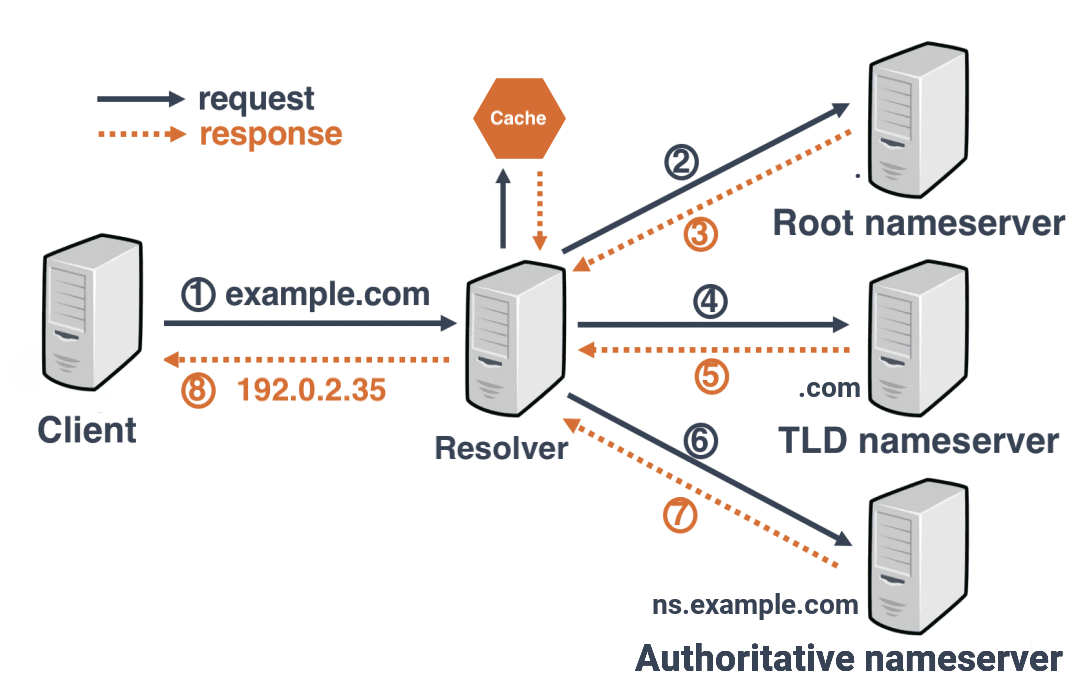
A basic name-to-IP resolution exchange. In practice, the lookup may traverse multiple tiers or caching layers before the final address is returned.
Troubleshooting Steps
1. Review /etc/nsswitch.conf
This file defines the order and sources the system uses to resolve names. Look for the line beginning with hosts, which is the entry relevant to DNS resolution. In the example below, the host is configured to check local files first, then DNS, and finally fall back to the loopback address.

files→/etc/hostsdns→ One or more resolvers configured in/etc/resolv.confmyhostname→ Loopback
2. Check /etc/hosts for a static entry
If the resource you are working with appears in /etc/hosts, verify that the IP address and format are correct. Once confirmed, confirm that the remote resource is accessible on the desired port and responding efficiently (e.g., LDAP on port 389). Depending on the resource, you can test with nc, telnet, or curl.
If the entry is correct and the port is open, hostname resolution for that resource is handled statically and no further DNS testing is needed.

3. Validate the resolvers in /etc/resolv.conf
If the resource is not resolved by /etc/hosts, it is handled by your internal or external DNS infrastructure. The name servers are defined in /etc/resolv.conf. These servers may be caching, stub-zone, recursive, or standard authoritative systems, and the file can also include search domains and timeout values. See man 5 resolv.conf or the online man page for the full set of options.

In the example above:
- Three upstream resolvers are listed, along with a search domain.
- Two of the entries are upstream name servers that may perform any operation, including recursion.
- The first entry is
127.0.0.1(loopback), which typically indicates a local caching daemon such as nscd, dnsmasq, or unbound.
Caching systems can behave in several ways:
- Act purely as a cache for answers fetched from upstream servers.
- Provide their own authoritative answers via stub zones.
- Forward unknown queries to upstream resolvers.
- Perform full recursion.
Take a moment to confirm how the caching system in your environment is configured before moving on.
3a. Confirm each resolver is reachable
- Use
pingormtrto verify each resolver is available to the host. - If a resolver is unreachable or consistently slow, it will impact resolution time for every query that hits it.
3b. Query each resolver directly
- Use
nslookupordigto query each resolver individually for the target name. - Confirm that each resolver returns the same answer in a timely manner.
- If one resolver is slow, returns multiple addresses, or does not respond at all, it can degrade the application’s behavior.
3c. Validate the caching layer’s forwarders
If a local caching daemon is in play (indicated by the 127.0.0.1 entry), review its configured forwarders. Ensure those upstream servers respond with the correct answer in a timely manner. A misconfigured or overloaded forwarder will cause the local cache to time out or return stale data, which manifests as slow or failed lookups in the application.