DNS Resolution and Zone Files
Luke Hebert
- 7 minutes read - 1362 wordsDNS is the backbone of name-to-address mapping on the Internet, and understanding how it works saves you hours of troubleshooting when a site goes down or mail stops flowing. This guide covers the architecture behind DNS, how iterative resolution actually happens, and the zone file syntax mistakes that most often take a server offline.
DNS Architecture
DNS architecture is a hierarchical distributed database and an associated set of protocols that define:
- A mechanism for querying and updating the database.
- A mechanism for replicating the information in the database among servers.
- A schema of the database.
DNS originated in the early days of the Internet when the network was small and established by the United States Department of Defense for research purposes. Host names were managed through a single HOSTS file on a centrally administered server, and each site that needed to resolve names downloaded that file. As the number of hosts grew, the traffic generated by updates increased along with the size of the HOSTS file. The need for a scalable, decentralized system with support for various data types became obvious.
The Domain Name System, introduced in 1984, filled that gap. With DNS, host names reside in a database distributed among multiple servers, decreasing the load on any one server and allowing per-partition administration. DNS supports hierarchical names and registration of various data types beyond the simple host-name-to-IP mapping used in HOSTS files. Because the database is distributed, its potential size is unlimited and performance does not degrade when more servers are added.
The original DNS was based on RFC 882 (“Domain Names: Concepts and Facilities”) and RFC 883 (“Domain Names: Implementation and Specification”), which were eventually superseded by RFC 1034 and RFC 1035. The implementation of DNS, Berkeley Internet Name Domain (BIND), was originally developed for the 4.3 BSD UNIX Operating System.
Domain Name Space
The domain name space consists of a tree of domain names. The tree sub-divides these names into zones beginning at the root. Each node or leaf in the tree has zero or more resource records holding information associated with a domain name. In general, a DNS zone may only contain one domain and its sub-domains. However, depending on the administrative authority delegated to the manager, a DNS zone may contain many domains and sub-domains.
Domain Name Syntax
A domain name consists of one or more parts, each part technically called a label. These labels are conventionally concatenated and delimited by dots, such as example.com.
- com
- joes
- www
The right-most label conveys the top-level domain. In this example, the domain name www.joes.com belongs to the top-level domain com. The hierarchy of domains descends from right to left. Each label to the left of com specifies a subdivision or subdomain of the domain to the right. For example, the label joes specifies a subdomain of the com domain, and www is a subdomain of joes.com.
This tree of subdivisions may have up to 127 levels, and each label may contain up to 63 characters. The full domain name may not exceed a total length of 253 characters in its external dotted-label specification, though in practice many domain registries enforce shorter limits.
DNS names may technically consist of any character representable in a binary octet. However, the allowed formulation of domain names in the DNS root zone and most other sub-divisions uses a preferred format and character set. The characters generally allowed in a label are a subset of the ASCII character set, also known as the LDH rule (letters, digits, hyphen), and include a-z, A-Z, 0-9, and the hyphen. These labels may not start or end with a hyphen.
A hostname in the DNS system is a domain name that has at least one IP address associated. For example, the domain names www.joes.com and joes.com are hostnames, whereas the com domain is not.
Address Resolution Mechanism
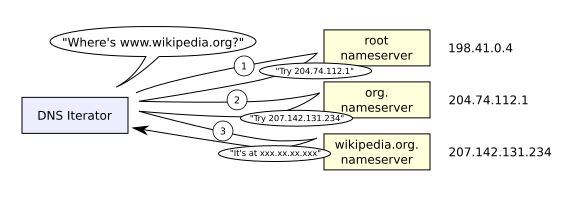
Domain name resolvers determine the appropriate domain name servers responsible for the domain name in question by a sequence of queries starting with the right-most (top-level) domain label. In general, a host will be configured with an initial cache of the known addresses for the root nameservers (hints). This local cache may be updated periodically by an administrator from a reliable source. Queries are then made in succession in an attempt to locate the final host address.
The mechanics of resolution are broken out below:
- An initial query is made to one of the root servers, using the hints, in an attempt to find the authoritative server for the top-level domain.
- An additional query is made to the TLD server in an attempt to locate the authoritative server for the second-level domain.
- This process is repeated in succession, starting with the right-most label of the domain name, until the final authoritative server is queried and returns the IP address of the host being resolved.
Keep in mind that each authority can delegate another system or node in the tree as authoritative during the process. The mechanism itself is quite simple, but it would place a very large operating burden on the root servers if every single DNS search started by querying one of them. Since the root servers are so critical to the overall function of the system, such heavy use would create an insurmountable bottleneck for the trillions of queries placed every day. In practice, caching is used in DNS servers to overcome this problem, and as a result, root nameservers are involved with very little of the total traffic.
Editing Zones
When editing DNS zone files, you want to be 100% sure the changes you are making are correct before proceeding. Any errors may mean a site is down or email is not delivered now or the next time the server is rebooted, because the zone file will not load due to a syntax error. Always tail /var/log/messages for errors after you reload a zone, or use named-checkzone.
Dots and Proper Syntax
The dot at the end of a hostname signifies that it is a fully qualified domain name (FQDN) and should be left unchanged. If there is no dot following a hostname, it is assumed to be unqualified and the origin (the domain the zone is for, by default) is appended.
Incorrect:
example.com IN A 127.0.0.4The above example is missing a period terminating the domain. That entry will cause the FQDN to be example.com.example.com, which is not what is intended.
Incorrect:
mail. IN A 127.0.0.5The above example will cause an invalid record. When using a shortcut, leave the period off since you want the domain to be appended.
Incorrect:
smtp IN CNAME example.comCorrect:
smtp IN CNAME example.com.Do not forget your dots.
NS Records
An NS record must be a valid hostname, not an IP. Create A records for any nameserver hostnames.
Incorrect:
example.com. IN NS 127.0.0.1
example.com. IN NS 127.0.0.3
Correct:
example.com. IN NS cns1.example.com.
example.com. IN NS cns3.example.com.
cns1 IN A 127.0.0.1
cns3 IN A 127.0.0.3
Also note that unqualified records can be used (cns1 instead of cns1.example.com.) for the prior example, but it is best to use the FQDN for clarity.
The NS records for a domain define the authoritative nameservers and must match the nameservers set at the parent servers. This is also referred to as providing “glue” for a domain, since these records bind the nameservers to an IP address.
Incorrect:
example.com. IN NS ns232.websitewelcome.com.
example.com. IN NS ns233.websitewelcome.com.
Correct:
example.com. IN NS cns1.example.com.
example.com. IN NS cns3.example.com.
CNAME Records
CNAME records (aliases) must be a valid hostname and not an IP address.
Incorrect:
mail IN CNAME 127.0.0.5Correct:
mail IN CNAME ghs.google.com.MX Records
MX records must be set to FQDNs, and do not forget to set a priority. If there is no existing hostname to use, create an A record that points to the IP and set the MX record to that.
Incorrect:
example.com. IN MX 127.0.0.4Correct:
mail IN A 127.0.0.5
example.com. IN MX 0 mail.example.com.
References
- Domain Name System. Retrieved from https://en.wikipedia.org/wiki/Domain_Name_System, Dec 11, 2012.
- How Domain Name Servers Work. Retrieved from http://www.howstuffworks.com/dns.htm, Nov 21, 2012.
- How DNS Works. Retrieved from http://technet.microsoft.com/en-us/library/cc772774%28v=ws.10%29.aspx, Nov 20, 2012.